


Three weeks. That’s how long I spent last spring helping a friend’s HVAC company pick new scheduling software, and somewhere in there I ended up going through more service scheduling software reviews than any reasonable person should. Fifty-plus, easily, across G2, Capterra, and a handful of independent comparison sites. Two platforms sat at 4.5 stars on the same review page. One turned into a nightmare for his six-tech crew. The other fit like it was built for them. Same rating, wildly different outcomes.
That gap is basically why this exists. If you’re digging through service scheduling software reviews trying to separate what’s real from what’s marketing wearing a customer’s face, you’re not being paranoid. You’re doing the thing most people skip. This is what actually held up once I got past the star counts and read the fine print, the complaints, and the fifth review down instead of just the top three a platform decides to surface. What follows is my honest breakdown of service scheduling software reviews across the major platforms, industry by industry.
What This Software Actually Does (Skip This If You Already Know)
Booking, dispatch, calendar syncing, sometimes invoicing bolted on top. That’s the short version. Field service tools handle crews driving between job sites. Appointment tools handle clients walking into a salon chair or a clinic. Different beasts, often lumped into the same “best scheduling software” lists, which is part of why so many service scheduling software reviews feel useless once you actually need one.
The demo lies to you, by the way. Every sales rep shows a calendar with five neat appointments and zero chaos. Nobody demos day 47, when you’ve got three cancellations, a late tech, and a customer texting to reschedule for the fourth time. That’s the gap real service scheduling software reviews fill, when they’re written by people who stuck around past the honeymoon period.
The market backing all this isn’t small either. Appointment scheduling software crossed roughly $600 million globally in 2025, nearly double where it sat three years earlier. More vendors keep piling in, which means more noise across service scheduling software reviews and more reason to read past the star count. Field service specifically has its own ecosystem worth checking separately — the dispatch-heavy platform reviews read completely differently from generic booking-app reviews, because the pain points just aren’t the same, and that’s another reason generic service scheduling software reviews miss the mark for trades businesses.
The Platforms That Actually Held Up
Here’s where things landed, based on pricing transparency, what repeated across dozens of service scheduling software reviews, and some gut feel from watching real businesses use these day to day.
| Rank | Platform | Best Fit | Starting Price | Why It Held Up (or Didn’t) |
| 1 | Jobber | Small to mid crews, 1-15 techs | ~$29/user/month | Best balance of price and depth |
| 2 | Housecall Pro | Solo operators, fast setup | ~$59/month | Fastest to deploy, weaker reporting |
| 3 | ServiceTitan | Established mid-large ops | 250-498/user/month | Powerful, but overkill for small crews |
| 4 | Square Appointments | Salons, single-location retail | Free tier + processing fees | Great for walk-in booking, not dispatch |
| 5 | Calendly-style tools | Consultants, solo services | Often free | Simple, but no dispatch capability |
Jobber topped the list not because it’s flashy but because it’s the one I found the fewest angry service scheduling software reviews about. Housecall Pro held up well for anyone who just needs to get running this week, and it shows up consistently in service scheduling software reviews written by solo operators. ServiceTitan earned its spot honestly, though the price gap isn’t small — one independent pricing breakdown puts it at 5 to 8 times more per user than Housecall Pro, before setup fees even enter the picture.
A two-truck plumbing outfit paying ServiceTitan prices is, in most cases, paying for features they’ll never touch. I’ve seen it happen. Service scheduling software reviews from small operators who went that route tend to say the same thing: impressive software, wrong size shoe.
What Separates a Useful Review From a Useless One
“Easy to use, would recommend.” That told me nothing, across all fifty-plus service scheduling software reviews I went through. I started skipping those entirely.
What actually held up: reviewers who mentioned reschedule flows, not just the initial booking. People who talked about the mobile app working (or not) in a dead-zone job site, not just praise for the desktop dashboard. Real friction shows up in specifics. Vague praise usually means the person barely used the thing before writing about it.
A short list of what the better service scheduling software reviews consistently covered:
- Whether cancellations and reschedules need manual work or happen on autopilot
- How recurring jobs are handled versus one-off bookings
- Actual numbers on no-show reduction, not just a vague “fewer no-shows now”
- Whether reporting comes standard or costs extra
- Support responsiveness outside business hours
- What happens, cost-wise, if you ever want to leave
That last one gets buried constantly. A surprising chunk of complaints in service scheduling software reviews have nothing to do with scheduling at all — they’re about getting charged hundreds of dollars just to export customer data that belonged to the business from day one. Read the exit terms before you sign. Not after. It’s the one detail that separates useful service scheduling software reviews from ones that only talk about features.
Pricing: What the Homepage Doesn’t Tell You
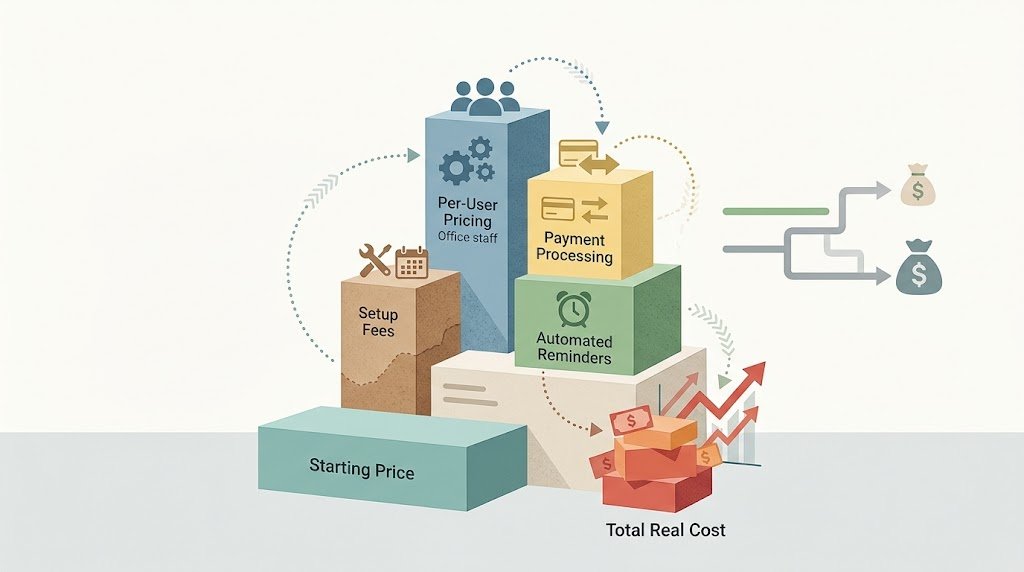
Every vendor shows a small starting number. Then the real cost shows up somewhere else entirely, and this is where a lot of the fifty-plus service scheduling software reviews I read turned sour fast.
Per-user pricing balloons once office staff get added, not just field techs. Payment processing gets stacked on top of the subscription fee. Automated reminders, which should honestly be table stakes by now, get locked behind a pricier tier on more platforms than you’d expect. Setup fees don’t get mentioned until the sales call, and by then you’ve already sat through forty minutes of demo and feel weird backing out.
One resource comparing ServiceTitan against its competitors flagged setup complexity alone adding 10 to 15 percent on top of license costs at the enterprise tier. That tracks with what actual users describe in the longer, more detailed service scheduling software reviews — the ones that go past “good product” and actually break down a real invoice.
Cheap isn’t automatically cheaper, though. A $29 plan missing automated reminders might cost more in missed appointments over a year than a $79 plan that includes them. Do that math before the sticker price makes the decision for you, and check what service scheduling software reviews say about renewal pricing too, since first-year discounts rarely stick around.
What G2 and Capterra Reviews Actually Show, Once You Read Them
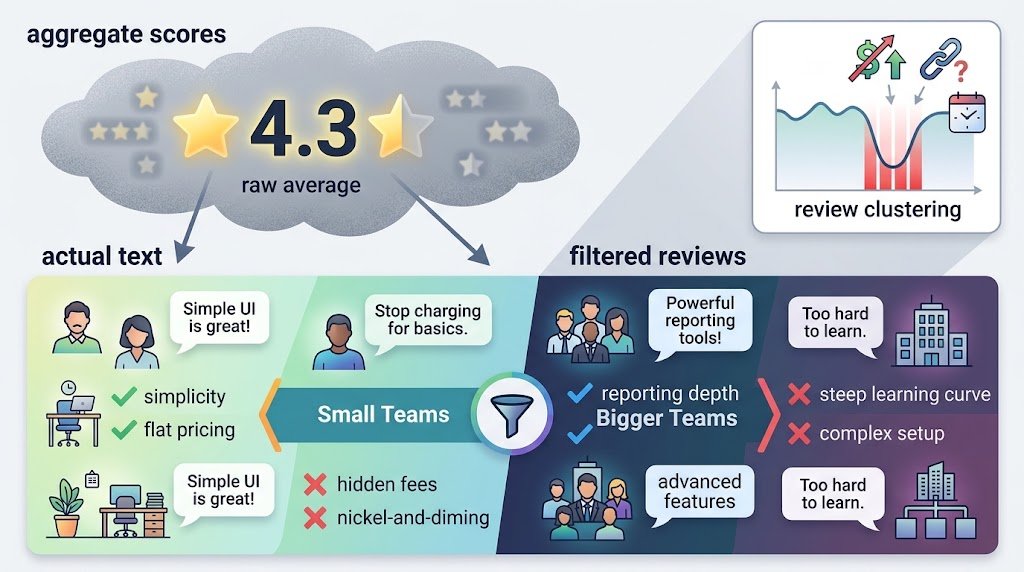
Aggregate scores average into mush. A 4.3 across 74 reviews sounds fine until you read the actual text and realize half the praise and half the complaints are about the exact same feature, just from businesses of different sizes.
Small teams love simplicity, hate feeling nickel-and-dimed for basic features. Bigger teams love reporting depth, hate the learning curve bundled with it. Neither group is wrong. They just need different things, which is exactly why one flat star rating told me so little across those fifty-plus service scheduling software reviews. Platforms that let you filter reviews by company size and role beat a raw star average almost every time, and it’s a habit worth carrying into any service scheduling software reviews you read going forward.
One thing worth flagging: a cluster of one-star reviews all dated within the same month usually means something specific happened — a pricing change, a feature removal, an acquisition — not that the core product suddenly got worse overnight. Check the dates before you panic over a bad-looking recent stretch in a batch of service scheduling software reviews.
Reviews Look Totally Different Depending on Your Industry
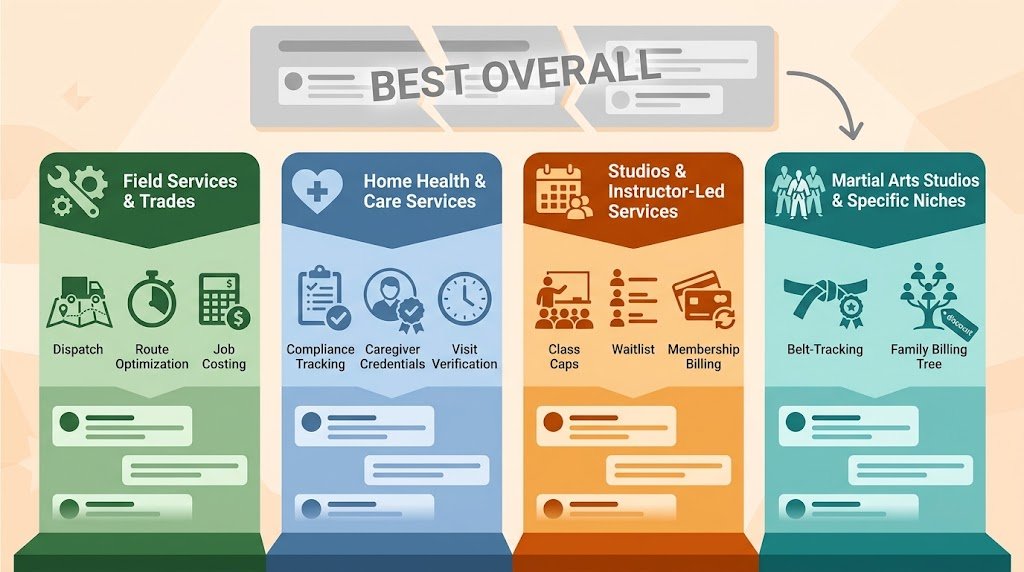
Generic “best scheduling software” roundups fall apart here, and it’s the biggest blind spot I ran into while reading service scheduling software reviews. A tool beloved by HVAC crews can be a genuinely bad fit for a med spa. Read service scheduling software reviews through the lens of your actual business, not as universal verdicts.
Field service and trades care about dispatch, route optimization, and job costing more than a pretty booking page. Service scheduling software reviews from auto shop operators consistently rank parts inventory syncing and technician time tracking above client-facing polish — makes sense, since the client never even opens the app.
Home health and care services need compliance tracking, caregiver credentials, visit verification. Home health software reviews dismiss otherwise-solid generic tools fast if those features are missing, no matter how clean the calendar looks, and that pattern shows up in nearly every batch of service scheduling software reviews I read for that industry.
Studios and instructor-led services need class caps, waitlists, membership billing. Even a niche category like martial arts studio management has its own review world, full of complaints about belt-tracking or family-discount billing that a generalist tool just doesn’t bother with.
So don’t trust a “best overall” list that skips segmenting by business type. A glowing review from a hair salon owner says almost nothing about whether the same tool can run a twelve-person plumbing crew, which is exactly why industry-specific service scheduling software reviews matter more than a generic ranking.
Can You Even Trust These Reviews?
Some percentage of five-star reviews are incentivized. A gift card, a discount, sometimes just an email nudge from the vendor asking happy customers to leave a rating while ignoring the frustrated ones. Not illegal, technically disclosed most of the time, but the disclosure sits in fine print nobody reads.
Most of the fifty-plus service scheduling software reviews I went through weren’t fake, to be clear. But verified-purchaser badges carried real weight with me, and I got suspicious of review clusters that all landed right after a product launch — that’s usually a campaign, not organic enthusiasm.
Reviews mentioning specific numbers, specific complaints, specific support interactions read as far more credible than the ones that just say “great product, highly recommend” and stop there. My gut-check test for any service scheduling software reviews: does the review mention even one downside? Long-term users almost always have at least a small gripe about software they otherwise love. Zero criticism in a long, detailed review is worth a second look, not automatic trust.
Mistakes People Keep Making With These Reviews
Trusting the aggregate score without reading the text is the big one. A 4.6 average hides a lot. Skip the number, read fifteen or twenty full service scheduling software reviews minimum, not just the top three the platform decides to surface first.
Reading reviews from businesses way bigger or smaller than yours is another trap. Solo operators reading enterprise-tier ServiceTitan reviews will come away with pain points that have nothing to do with their actual day-to-day.
Not checking dates matters more than people assume. Software changes fast — a glowing 2023 review might describe a feature set that’s since been gutted or overhauled entirely, so date-check every batch of service scheduling software reviews before trusting the overall tone.
And the expensive one: skipping cancellation and export terms because the service scheduling software reviews were all about features, not exit friction. By the time someone writes an angry review about exit fees, it’s already too late for them. Read the contract yourself. Don’t outsource that to strangers on the internet.
Quick Checklist Before You Sign Anything
- Filter service scheduling software reviews by your business size and industry, skip the generic top results
- Get the real all-in monthly cost, add-ons included
- Ask directly about data export fees and contract length
- Look for reviews mentioning actual support response times
- Flag anything older than 18 months as possibly outdated
- Test the mobile app yourself during the trial, not just the desktop view
Takes maybe an extra hour. Beats finding out the hard way that “affordable” plan skips the one feature you actually needed.
Final Thoughts
After fifty-plus service scheduling software reviews, the thing I’d want someone to walk away with is this: the star rating gets you through the door, but it’s not the verdict. What’s actually written inside those service scheduling software reviews, filtered by businesses that look like yours, is where the real answer lives. I watched too many owners pick a tool off a “best of” list without checking whether that list was even written with their industry or team size in mind.
The market’s only getting more crowded from here. Appointment scheduling software is on track to keep growing for years, which means more vendors flooding review platforms with polished case studies and incentivized five-star testimonials. That’s not a reason to distrust every batch of service scheduling software reviews out there. It’s a reason to slow down and read more carefully than the platform wants you to.
A handful of detailed, dated, specific service scheduling software reviews from businesses your size beats a hundred generic five-star ratings, every time. My honest take after going through this many: don’t chase whatever tops the ranking overall. Chase the tool with the fewest complaints about the exact things that would break your workflow. Solo operator? Prioritize simplicity and price over dispatch depth. Growing crew? Sometimes it’s worth eating a higher price now to dodge a painful migration eighteen months from now. Neither answer is universal, and anyone claiming there’s one best pick across every collection of service scheduling software reviews is oversimplifying to sell you something.
Take the extra hour before you commit. Read past the star rating. Check the cancellation terms while you still can, not after you’re locked in. Do that much, and you’ll skip most of the horror stories buried in these service scheduling software reviews — and land on something that actually fits how your business runs, not how a forty-minute demo made it look.
Frequently Asked Questions
Are online service scheduling software reviews trustworthy?
Mostly, yes — but some are incentivized or posted in suspicious clusters. Weight verified-purchaser reviews heavily and stay wary of ones with zero criticism at all.
What’s the biggest recurring complaint in service scheduling software reviews?
Hidden costs. Data export fees, paywalled basic features, and setup charges nobody mentioned during the sales call top the list.
Do reviews really differ that much between industries?
Yes, significantly. Field service reviews obsess over dispatch and job costing; salon or studio reviews care about booking pages and membership billing instead.
How many reviews should I actually read before trusting a rating?
At least fifteen to twenty full-text reviews, ideally from businesses close to your size and industry — skip relying on the aggregate number alone.
Is the cheapest scheduling software usually the best deal?
Not necessarily. A cheap plan without automated reminders can cost more in missed appointments than a pricier plan that includes them.

An IT career coach with 7 years of experience helping beginners map out certification paths that actually lead to interviews, not just another resume line. He’s guided dozens of career-switchers through their first AWS or CompTIA exam and writes for itechnova.io, covering IT certifications, cybersecurity, and the software tools people actually need to know.