


Anyone digging through patriot software reviews online usually finds the same recycled list — cheap, easy, good support, moving on. That’s not wrong, exactly, but it’s thin. I’ve spent enough hours poking around payroll tools for small businesses to know the interesting stuff sits underneath the surface pitch.
This piece digs into what most patriot software reviews skip entirely: the quirks, the fine print, and the stuff that actually changes whether this tool fits your business. Grab your coffee. We’re going past the marketing page.
What Patriot Software Actually Is
Before jumping into the surprises, here’s the quick version. Patriot Software is a cloud-based payroll and accounting platform built mainly for small teams. It splits into two products — payroll and accounting — that can run separately or together.
Founded in Canton, Ohio, the company built its reputation on being the no-frills option. Not flashy, not stuffed with extras, just functional. That simplicity is exactly why so many patriot software reviews praise it, but it’s also where the surprises start.
Small business owners tend to fall into two camps when they first hear about Patriot. Some assume it’s a stripped-down toy that can’t handle real payroll complexity. Others assume it’s just a cheaper Gusto clone. Neither assumption holds up once you actually poke around the platform for a week.
The Pricing Structure Isn’t What You’d Guess
Most payroll software throws a single flat number at you and calls it a day. Patriot doesn’t work quite like that.
There are two payroll tiers — Basic and Full Service. Basic handles the payroll runs, but you’re responsible for filing your own payroll taxes. Full Service takes that off your plate entirely, filing federal, state, and local taxes on your behalf.
Here’s the table most reviews forget to include:
| Plan | Monthly Base | Per-Employee Fee | Tax Filing Included |
| Basic Payroll | ~$17 | ~$4/employee | No — you file yourself |
| Full Service Payroll | ~$37 | ~$4/employee | Yes — federal, state, local |
| Accounting Software | ~$20 | N/A | N/A (separate product) |
That gap between Basic and Full Service catches a lot of new business owners off guard. Filing your own payroll taxes sounds simple until you’re staring at a stack of forms in April, wondering which state deposit schedule applies to your business.
Here’s the thing nobody mentions upfront — the $20 difference between tiers can save you dozens of hours a year if you’re not confident handling tax deposits yourself. For a solo owner already juggling five other jobs, that math usually favors Full Service, even though Basic looks cheaper on paper.
Annual billing knocks a bit off the total too, though most patriot software reviews barely mention that option exists. If you’re committed long-term, it’s worth asking about during signup instead of defaulting to monthly.
Free Direct Deposit Isn’t Actually Universal Anymore
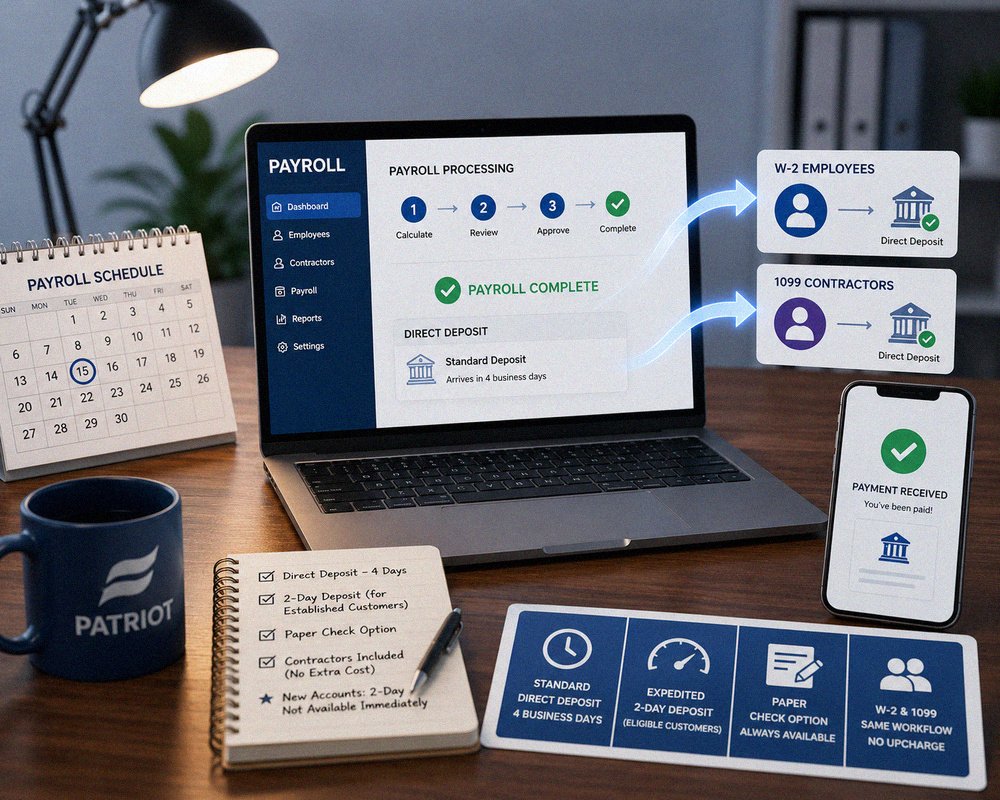
Direct deposit used to be Patriot’s headline freebie — something rivals charged extra for. These days most competitors bundle it too, so it’s less of a standout than patriot software reviews from a few years back suggest. That’s the kind of detail most patriot software reviews gloss over completely.
Where it does still shine: standard direct deposit lands in four business days, which is on par with most of the field. Established customers can eventually qualify for faster, two-day deposits. Paper checks remain an option too, for anyone who still prefers old-school payday.
Contractors get the same setup as W-2 employees, which honestly isn’t a given across every payroll platform out there. Some competitors charge extra just to add 1099 contractor payments — Patriot folds it into the same workflow without an upcharge.
One small wrinkle worth knowing: if your business is brand new to payroll, the two-day expedited option won’t be available right away. Patriot needs payment history to build confidence in your account before speeding things up, which makes sense from a fraud-prevention standpoint but can feel slow in month one.
There’s No Long-Term Contract Trap

This one genuinely surprises people who’ve been burned by other software vendors. Patriot runs month-to-month. No annual lock-in, no cancellation penalty buried in a 40-page terms document.
You can cancel anytime and won’t owe some awkward early-termination fee. For a small business testing the waters — maybe switching from spreadsheets for the first time — that flexibility matters more than people realize going in.
Compare that to some competitors who quietly auto-renew annual contracts and make cancellation a multi-week email chain. Patriot’s approach feels almost refreshingly boring by comparison, and boring is exactly what you want from payroll software.
That said, month-to-month billing does mean you’re paying full price without an annual discount unless you specifically ask. It’s a trade-off — flexibility versus savings — and different businesses will weigh that differently depending on how confident they feel committing upfront. It’s a point plenty of patriot software reviews mention only in passing.
Support Is Genuinely US-Based, and That’s Rarer Than You’d Think

A ton of payroll companies route support overseas once you dig past the sales team. Patriot keeps its support team domestic, and customers consistently mention short wait times, often under five minutes on the phone.
That’s not just a nice-to-have. Payroll mistakes cost real money — a missed tax deposit or a miscalculated withholding isn’t something you want stuck in a support queue for three days. If you’re brushing up on the underlying rules yourself, the IRS publishes federal payroll tax rules that’s worth bookmarking regardless of which software you land on.
What’s interesting is how often reviewers specifically mention switching to Patriot after a bad support experience elsewhere. Reading through actual customer feedback, a pattern shows up again and again: someone used a bigger, pricier platform first, hit a wall trying to get a human on the phone, then found Patriot almost by accident.
Live chat is available too, alongside phone support, which covers people who’d rather type than talk through a payroll problem mid-workday.
The Accounting Software Is a Completely Separate Purchase
Here’s where a lot of buyers get tripped up. Payroll and accounting aren’t bundled by default — they’re two distinct products that happen to integrate well if you buy both.
Skip the accounting add-on, and you’re still fine running payroll on its own. But if you assumed one subscription covers your books too, that’s not how it works here. Budget accordingly.
The upside, once you do combine both, is that payroll entries post automatically into your books. No manual re-entry, no reconciling numbers between two disconnected systems at month-end. Businesses that switched from juggling payroll in one tool and QuickBooks in another often describe this as the single biggest time-saver in the whole switch.
Still, if you’re already happy with your current accounting software and only need payroll, there’s no requirement to touch Patriot’s accounting product at all. The two genuinely function as separate purchases, not a forced bundle — something patriot software reviews rarely spell out clearly.
HR Features Are Thinner Than Bigger Competitors
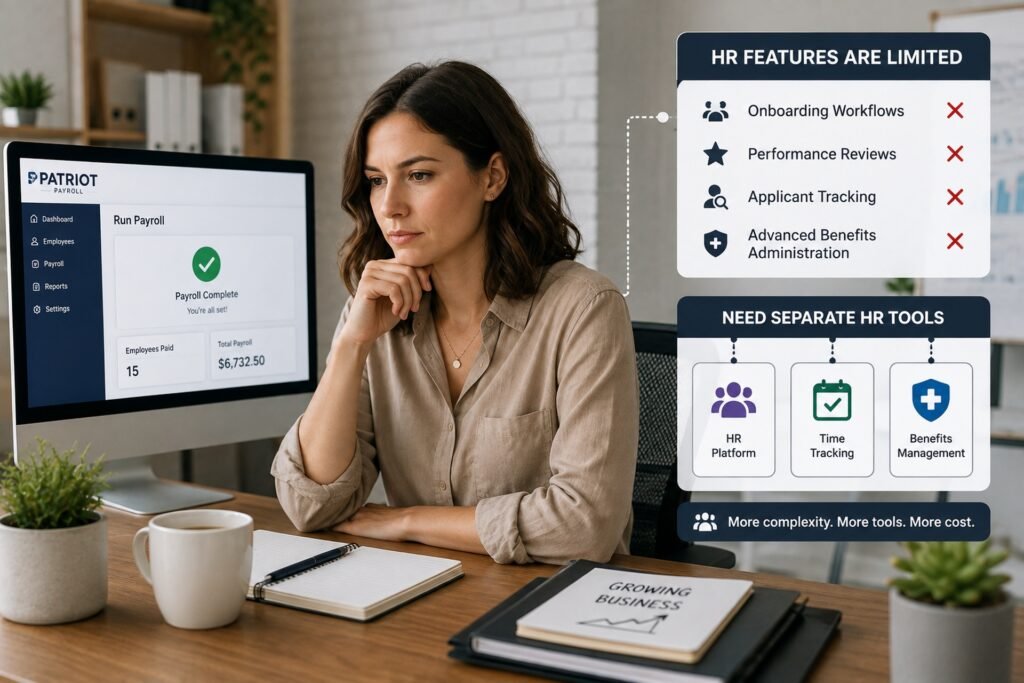
This is the honest con nobody wants to lead with. Patriot isn’t trying to be an all-in-one HR suite. Time tracking, PTO management, and basic HR tools exist as add-ons, but they’re nowhere near as deep as what you’d get from a platform built around HR first, payroll second.
Growing past 15-20 employees, or juggling complex benefits administration? You’ll likely outgrow what Patriot offers here. It’s a payroll tool that happens to have some HR features bolted on, not the reverse.
Onboarding workflows, performance reviews, applicant tracking — none of that exists inside Patriot. If your business needs those pieces, you’ll be running a separate HR platform alongside it, which adds a bit of complexity back into a setup that’s otherwise refreshingly simple.
For a five-person shop, this limitation barely registers. For a fifty-person company scaling fast, it becomes a real bottleneck sooner than expected — a gap that shows up in almost every honest patriot software reviews roundup.
Real Customer Feedback Skews Surprisingly Consistent
Scroll through review platforms and the same three words keep popping up — easy, affordable, responsive. That consistency is actually a little unusual. Most software gets a mixed bag of praise and complaints depending on who you ask.
The recurring criticism, when it shows up, centers on the learning curve during initial setup and occasional gaps in more advanced reporting. Nothing dramatic, but worth flagging before you commit.
What stands out reading dozens of these reviews back-to-back is how many mention switching from a previous, more expensive provider and never looking back. That’s a stronger signal than star ratings alone — people who’ve already tried alternatives and chose to stay tend to be more reliable judges than first-time buyers still in the honeymoon phase.
Patriot Software Reviews: Is It Worth Your Time
Short answer — probably, if you’re a small team that wants straightforward payroll without paying for features you’ll never touch. Longer answer depends on where your business is headed.
If HR complexity is coming down the pipeline soon, you might outgrow Patriot faster than you’d like. But for a business with under 20 employees that just needs payroll done right, this remains one of the more sensible picks in the category. For a broader sense of how it stacks up dollar-for-dollar against competitors, a detailed pricing breakdown review from an independent software publication can round out what you’re seeing here.
Owners who’ve run payroll manually before — spreadsheets, calculators, crossed fingers — tend to appreciate Patriot the most. The jump in reliability feels dramatic even though the software itself is fairly modest compared to enterprise-grade tools.
Common Mistakes Business Owners Make With Patriot Software
A few patterns show up again and again among first-time users.
Picking Basic Payroll without realizing they’re now on the hook for tax filings is the biggest one. Some owners assume “payroll software” automatically means taxes are handled — that’s only true on Full Service. This mistake shows up constantly across patriot software reviews left by first-time buyers.
Another mistake: forgetting the accounting software is separate, then wondering why their books aren’t syncing automatically. And a smaller one — not testing the free trial thoroughly enough before locking in a plan choice.
A less obvious mistake involves pay schedules. Patriot supports weekly, biweekly, semi-monthly, and custom cycles, but some new users default to whatever their old system used without checking if it still makes sense. Switching platforms is actually a decent moment to reconsider your pay schedule entirely.
How Patriot Compares to Bigger Payroll Platforms
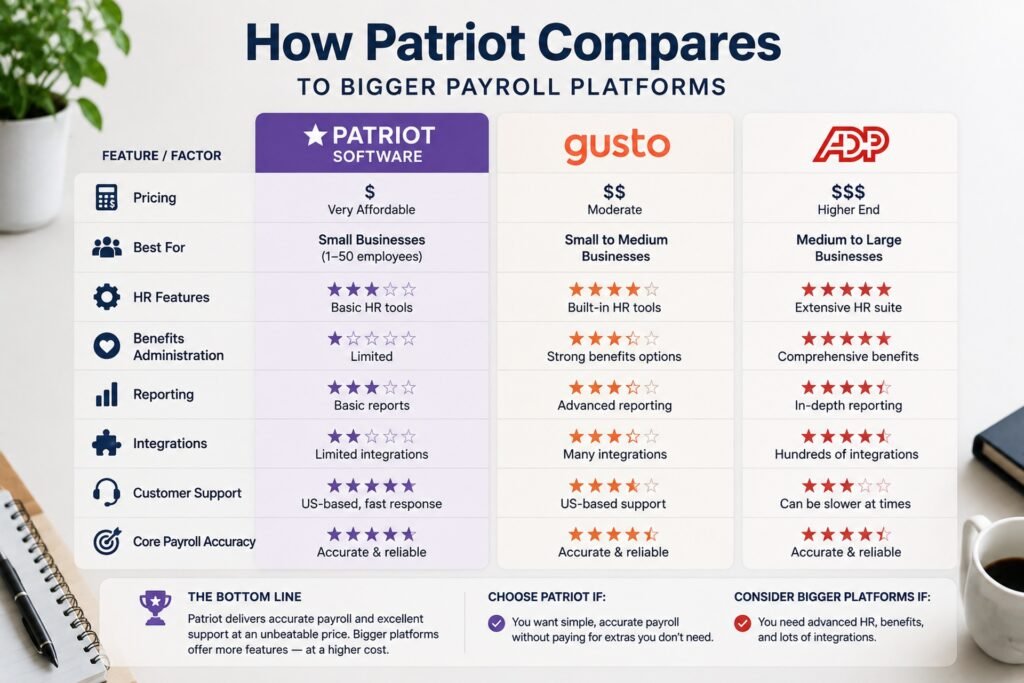
Bigger names like Gusto or ADP throw more features at you — deeper HR tools, benefits administration, more robust reporting. They also cost more, often significantly.
Patriot sits in a different lane entirely. It’s built for owners who want payroll handled correctly without paying for a dozen features they’ll never open. That trade-off is really the whole story here, and it’s why so many patriot software reviews land in similar territory — solid for simple needs, limited once things scale.
Where Patriot genuinely competes head-to-head with the bigger names is core payroll accuracy and customer support responsiveness. Where it falls behind is breadth — the sheer number of integrations, benefits partners, and HR modules that larger platforms have spent years building out.
Conclusion
Patriot Software isn’t trying to be everything to everyone, and honestly, that’s probably its biggest strength. It picked a lane — affordable, no-nonsense payroll for small businesses — and stayed in it instead of chasing every feature its bigger competitors offer.
What surprised me most while digging through this wasn’t the pricing or the support quality, though both hold up well. It was how consistent the feedback stayed across different review platforms. That’s the throughline across most patriot software reviews worth reading. Usually you’ll find at least one loud group of unhappy customers somewhere. Here, the complaints stay minor and repetitive rather than dramatic.
That said, this isn’t a universal fit. Businesses planning to scale past 20 employees, or ones that need serious HR infrastructure baked in, will likely hit walls faster than they’d like. The lack of bundled accounting, the split between Basic and Full Service tax handling, and the somewhat thin HR add-ons are all real limitations, not just minor footnotes.
For the right business — lean, small, payroll-focused — Patriot delivers exactly what it promises without inflating the price tag for extras you won’t use. Just go in knowing which tier actually covers tax filing, because that one detail trips up more new users than anything else on this list. Weigh your current team size against where you expect to be in two years, and the decision usually becomes obvious pretty quickly.
Payroll software isn’t a glamorous purchase, but getting it wrong is expensive and stressful in ways that ripple through your whole business. Patriot earns its reputation honestly, even with the gaps this article pointed out. Go in with clear eyes about what you’re buying, and it’s hard to go too far wrong here. Whether you land on Basic, Full Service, or skip the accounting bundle entirely, at least now you’re deciding with the full picture instead of just the sales pitch.
Frequently Asked Questions
Is Patriot Software good for very small businesses?
Yes, it’s specifically built with small teams in mind. Most reviewers running the software have somewhere between two and ten employees, and the simple interface suits that scale well.
Does Patriot Software file payroll taxes automatically?
Only on the Full Service plan. The Basic Payroll tier requires you to handle federal, state, and local tax filings on your own, which surprises a lot of new users.
Can I cancel Patriot Software anytime?
Yes, there’s no long-term contract. It runs month-to-month, so you can cancel without worrying about early termination fees or penalties buried in the fine print.
Is the accounting software included with payroll?
No, they’re sold separately. You can buy either product on its own, or combine both if you want payroll and bookkeeping working together.
How fast is direct deposit with Patriot Payroll?
Standard direct deposit typically takes four business days. Established customers may eventually qualify for faster two-day deposits once their account history builds up.
Does Patriot Software work well for businesses with complex HR needs?
Not really. HR features exist but stay fairly basic. Businesses needing deep benefits administration or advanced HR tools will likely outgrow what Patriot offers here.
What do most negative Patriot Software reviews mention?
The most common complaint is the initial learning curve during setup, along with occasional gaps in advanced reporting features compared to larger, pricier platforms.
Is Patriot Software cheaper than Gusto or ADP?
Generally yes. Patriot’s pricing tends to run lower than bigger competitors, though those platforms offer deeper HR and benefits features that Patriot doesn’t try to match.

An IT career coach with 7 years of experience helping beginners map out certification paths that actually lead to interviews, not just another resume line. He’s guided dozens of career-switchers through their first AWS or CompTIA exam and writes for itechnova.io, covering IT certifications, cybersecurity, and the software tools people actually need to know.
1 thought on “Patriot Software Reviews: 7 Shocking Things Nobody Tells You Upfront”